


-
About
About
-
Schools
Schools
-
Professional Learning
Professional Learning
Formats We Host
Overview & Calendars
Series
For Presenters & Members
- Careers Careers
-
Accreditation
Accreditation
-
Athletics
Athletics
- Login








 Quick Links
- Board of Trustees
- History
- Membership
- Mission
- Services to Schools
- Staff
 Upcoming Events
View All
 Careers
View All
School Portal Help›Add a staff member
Users · 2 min read
Add a staff member
Adding people to your school directory is how they receive NYSAIS professional-learning emails targeted to their role, and how they appear (if you want) on your public school page. Everyone you add starts with member access – see ‘Grant admin or user access’ if they need to edit school data.
Before you start
You need the Users permission (or admin access) on your own account. If your colleague’s email address does not use your school’s domain, the system will not let them self-register – you must create their account for them.
Steps
- Open the Users tab in the portal menu.
- Click the Add member button in the top right.
- Fill in all required fields. Scroll to the bottom – some required fields are down there and easy to miss.
- If you do not want this person listed publicly on your school page, turn off the Display On NYSAIS Public Website switch.
- Save.
Set a position and title correctly
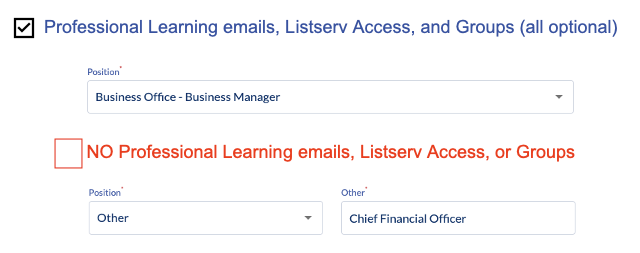
The Position field is a preset role NYSAIS uses to send targeted communications (Admissions Director, Business Manager, and so on). Match the closest one – it drives which emails they get. The Title field is free text where you write their actual title (Chief Financial Officer, Director of Enrollment Management, etc.). Both matter.
Cross-domain heads-up
The portal verifies each account by matching the email domain to your school’s website domain. If someone at your school uses an email that does not match (e.g. a personal Gmail, or an old parent-company domain), self-registration will fail. Create their account for them here instead – that bypasses the check.