

-
About
About
-
Schools
Schools
-
Professional Learning
Professional Learning
Formats We Host
Overview & Calendars
Series
For Presenters & Members
- Careers Careers
-
Accreditation
Accreditation
-
Athletics
Athletics
- Login








 Quick Links
- Board of Trustees
- History
- Membership
- Mission
- Services to Schools
- Staff
 Upcoming Events
View All
 Careers
View All
School Portal Help›Log in for the first time
Getting Started · 2 min read
Log in to your school portal for the first time
The NYSAIS school portal is where your school’s directory, profile, events, jobs, and receipts live. This page shows you how to get in – whether an account has already been set up for you or you’re starting from scratch. You only need your school email address.
Before you start
The portal uses your school’s email domain to confirm who you are. Use the email address your school assigned you (for example, you@yourschool.org) – not a personal Gmail or Yahoo.
Try “Forgot Password” first
If your school has ever registered anyone for a NYSAIS event with your email address, an account was already created for you.
- Go to the portal login page (button below).
- Click Forgot Password.
- Enter your school email and check your inbox for the reset link.
Register as a new user
If Forgot Password says your email is not on file, create a new account:
- On the login page, click Register as a New User.
- Fill in your school email and details.
- The system will confirm your school by domain and finish setup.
Once you’re in
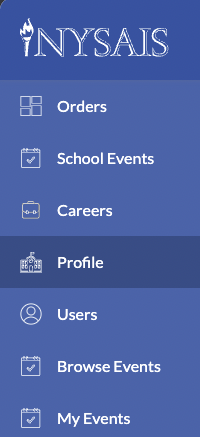
You’ll land on a left-hand menu. What you see depends on what your school has given you access to – the five directory sections (Orders, School Events, Careers, Profile, Users) each appear only for people with the matching permission. Everyone always sees Browse Events and My Events. If those are the only two items in your menu, you have “member” access and cannot edit school data yet. A Head of School or existing admin at your school can grant you a permission – or if they are not available, request one from NYSAIS support and we will approve based on your role at the school (a CFO asking for Orders to pull receipts, for example).