


-
About
About
-
Schools
Schools
-
Professional Learning
Professional Learning
Formats We Host
Overview & Calendars
Series
For Presenters & Members
- Careers Careers
-
Accreditation
Accreditation
-
Athletics
Athletics
- Login








 Quick Links
- Board of Trustees
- History
- Membership
- Mission
- Services to Schools
- Staff
 Upcoming Events
View All
 Careers
View All
School Portal Help›What is in your school directory
Getting Started · 3 min read
What is in your school directory
The school portal has five directory sections: Orders, School Events, Careers, Profile, and Users. Each one appears in your left-hand menu only if your school has given you the matching permission – so what you actually see may be fewer than five items. Below is what each section does, so you know what to ask for access to.
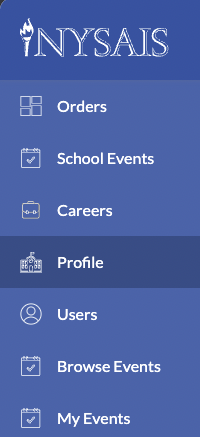
Orders
Invoices and receipts for NYSAIS event registrations that anyone at your school placed on nysais.org after July 1, 2022. View, print, or download for finance or reimbursement.
School Events
Events your school hosts (professional learning, open houses, admissions events, and similar). Post one here and it appears on your school page and, when public, in the NYSAIS Member School Events calendar.
Careers
Your school’s open job postings. Shown on your school page and featured in the Career highlights on the NYSAIS homepage.
Profile
Your public-facing school profile – description, banner image, contact info, links. Half of the 2.4 million yearly page views on nysais.org land on member-school profile pages.
Users
The people at your school with a record in the NYSAIS directory. Managed here: adding staff, editing titles, granting portal permissions, hiding or removing people.
Browse Events and My Events
These two menu items are for anyone at a NYSAIS member school. “Browse Events” lists everything open for registration on nysais.org. “My Events” is your own registration history.